





Understanding the Abstain Feature in Approval Path
When it comes to decision-making, there are times when we don’t want to give a definitive “yes” or “no.” Based on our customer’s request, we have launched a new feature in Approval Path: Abstain option. This option is working on both Approval Path for Jira and Approval Path for Confluence. The term ‘abstain’ means to stay neutral in a decision. This option allows you to opt out of a vote without siding with approval or rejection, which can be useful in several situations.

API Capabilities for Approval Path
Approval Path made the approval process so much easier. Still, there are ways companies can do more to improve business efficiency and connect with other tools. With our Approval Path for Jira or Approval Path for Confluence, you can easily generate API Keys from the global setting and customize to suit customer needs. API mechanism applies same to both, but the only difference is that in Jira, approval runs in the issue context.

The Notifications Feature and How to Use Them in The Approval Path for Jira
We’d like to introduce a great feature in Approval Path for Jira & Confluence designed to streamline your approval processes: additional notifications. This feature ensures that users are promptly reminded to take action on their approval steps, enhancing efficiency and accountability within your team. Here’s how it works with the example of Approval Path for Jira and how it can be used. You have a new notification How Notifications Work With the notifications feature in Approval Path for Jira, users can send reminders through either Jira or direct email notifications.

Product Development with Approval Path for Confluence
JES Factory product developers have been tasked with designing new products for the catalogue. Given the complexity of the job, they turned to the Approval Path for Confluence to efficiently coordinate their work with other departments to make sure the product checks off all the boxes. The Journey of the Product Development Lifecycle Ideate and Document the Product Concept The conceptualization team is the first to engage. Organizing and refining their ideas can be chaotic.

Delegate your approval steps in Approval Path
Approval Path for Jira: Elevate Your Approval Game Gone are the days when Jira’s built-in approvals left you wanting for more. With the new feature for the Approval Path Jira extension, the approval process is now streamlined, intuitive, and packed with features that will redefine how you manage approvals in your projects. What’s New? The Delegation Feature! Picture this: You’re on vacation, but an important approval awaits your nod. With the Delegation feature, you can now delegate your approval responsibilities to another user.

Streamlining Your Approval Process with Automation in Jira
Simplify your workflow and save time with just a few clicks. Why automation? Do you find yourself constantly starting approvals manually for each issue in your project? Do you wish there was a way to automate this tedious process? Well, we have great news for you! In this blog post, we will guide you through the steps to automatically start an approval path for any issue that goes through a specific status transition.
Approval Path start parametrization
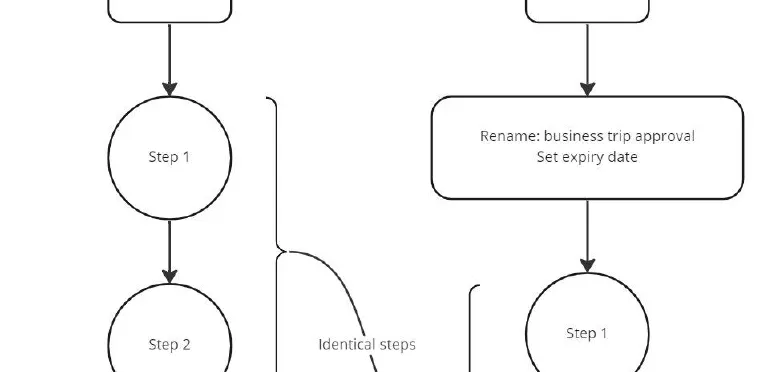
It’s about convenience and more! What is parametrization? In this context, parametrization is a rather fresh feature of Approval Path, and we think it could boost user experience a lot! Well, at least for users that use Approval Path more excessively. Here is why! Functionalities Parametrization will allow you to re-use an existing path (definition) while you conveniently rename the approval just before you start it! Also it allows you to set expiry dates.
Issue filed steps - email edition
Life is dynamic, so are we! What are issue fields If you already know the answer, skip this part! As the name suggests these are fields inside each issue on Jira, to name a few, The description field The assignee field The reported field All of these are standard issue fields in Jira, you can also have “Custom” fields. Custom fields can be placed upon your need, there is are many custom fields available on Jira but you will need to know only a few to take advantage of Approval Path’s dynamic features!
Approval Path for Confluence - Now free of charge
Fast, reliable, secure, and now FREE! I am thrilled as I write this blog! Approval Path for Confluence is officially free of charge now, regardless of your company size! How come?? The decision was made by taking many factors into consideration, although what ignited the idea is promotion. We know the amount of work and effort that is put into Approval Path as well, and we know that Approval Path is a solid solution to many projects in the Atlassian ecosystem.
Multiple approvals
You asked, we care, we listen and now we deliver! The time has come yet again for a new feature! A feature YOU asked for! If you are using the Approval Path, you have likely considered this feature at some point in your experience. Why can’t I just run multiple paths instead of only one?🤔 Well, that is no longer the case! What is Approval Path and why it matter?