API Capabilities for Approval Path
Approval Path made the approval process so much easier. Still, there are ways companies can do more to improve business efficiency and connect with other tools. With our Approval Path for Jira or Approval Path for Confluence, you can easily generate API Keys from the global setting and customize to suit customer needs. API mechanism applies same to both, but the only difference is that in Jira, approval runs in the issue context.

The Notifications Feature and How to Use Them in The Approval Path for Jira
We’d like to introduce a great feature in Approval Path for Jira & Confluence designed to streamline your approval processes: additional notifications. This feature ensures that users are promptly reminded to take action on their approval steps, enhancing efficiency and accountability within your team. Here’s how it works with the example of Approval Path for Jira and how it can be used. You have a new notification How Notifications Work With the notifications feature in Approval Path for Jira, users can send reminders through either Jira or direct email notifications.

Make Approval Path for Jira Processes Easier with Automation
Previously, Automation required technical expertise and the use of APIs. Based on the feedback of our customers, we have launched a new feature called ‘Automation’ in Approval Path for Jira , which enables us to skip semi-tech steps to set it up. With just a few clicks, we can save your time and reduce human errors by using Automation feature! Automation step for Approval Path Introducing new features of Automation The newly added Automation step can be performed at the definition level, which means specific automation settings can be applied to any kind of project as long as rule applies to the project.

Approval Path for Jira vs Herzum Approval
For people running or being a part of a project, especially a bigger one, it’s obvious that each project is a multi-step process. Each step often requires approval (or various approvals) before proceeding to the next one. For example, when an advertising agency is preparing a campaign for a customer before graphic designers can create visualizations, concepts must be proposed, selected, and approved by the creative team, project manager, and client.
Streamlined Financial Approvals in Jira
In the financial sector, where precision and compliance are paramount, approval processes have often been the bottleneck, stalling financial transactions. Enter Approval Path: the Jira extension transforms the cumbersome task of obtaining financial approvals into a streamlined, transparent, and swift process. The Challenge of Timely Approvals Imagine a scenario where a finance team is scrambling to get an unbudgeted software update approved. In a traditional setting, this would involve a series of emails, manual tracking of approvals, and constant follow-ups, leading to an agonizing wait - sometimes days - for a green light.

How-to: create your own financial approval with the Conditional feature
The Conditionals feature for the Approval Path creates many possibilities for more complex automation. With it, you can control processes without wasting time and energy analyzing what should happen next. You can set it up once and forget about manual management of approvals. One of the setups we know is often used is financial approval. Let’s look at a scenario: The marketing team needs a new camera and photo editing software budget.

Navigating Feature Deployment with Approval Path for Jira
OrbTech, a hypothetical mid-sized tech company, is deploying a new feature. The recent development of a new functionality takes many steps and requires cooperation from multiple departments. Let’s dive into their journey, highlighting how the Approval Path for Jira played a pivotal role. Creating the feature Maya, the dev lead, initiates the first approval request using Approval Path within their Jira system to ensure the new feature meets OrbTech’s initial standards and requirements.

Conditionals Feature in Approval Path
The new Conditions feature for improving workflow and approval management is here! The introduction of conditional approvals in Approval Path opens up a world of possibilities for project management. By integrating the power of Jira expressions and the Jira REST API, this feature offers a dynamic, adaptable approach to project management that fits perfectly with your unique operational needs. Tailored Approvals for Every Scenario The Conditions feature in Jira allows for a high level of customization in managing project workflows.

Delegate your approval steps in Approval Path
Approval Path for Jira: Elevate Your Approval Game Gone are the days when Jira’s built-in approvals left you wanting for more. With the new feature for the Approval Path Jira extension, the approval process is now streamlined, intuitive, and packed with features that will redefine how you manage approvals in your projects. What’s New? The Delegation Feature! Picture this: You’re on vacation, but an important approval awaits your nod. With the Delegation feature, you can now delegate your approval responsibilities to another user.

Approval Path start parametrization
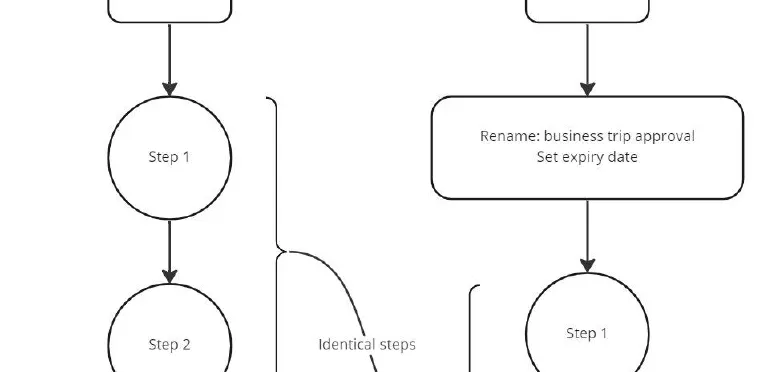
It’s about convenience and more! What is parametrization? In this context, parametrization is a rather fresh feature of Approval Path, and we think it could boost user experience a lot! Well, at least for users that use Approval Path more excessively. Here is why! Functionalities Parametrization will allow you to re-use an existing path (definition) while you conveniently rename the approval just before you start it! Also it allows you to set expiry dates.