




Confluence Has Native Approvals. But What Happens When the Approver Is External?
Approvals are becoming a native part of Confluence.
Atlassian has introduced built-in approvals for Confluence pages, bringing formal review, approval history, required reviewers, due dates, and publishing controls directly into the content lifecycle. For teams that need straightforward internal sign-off, that is an important step forward. But approval processes rarely stop neatly at the boundary of your Confluence site.
A Statement of Work may require client approval. An architectural proposal may be sent to an external consultant. A policy or security document may require confirmation from a partner, auditor, or vendor. And that changes the problem considerably.
The question is no longer simply, “Can we approve a Confluence page?”
It becomes: How do we keep that approval connected to Confluence when the person making the decision isn’t part of our Confluence environment?
The problem with offline and email approvals
At first, this approach seems manageable.
A document is exported, attached to an email, and sent for review. Feedback arrives in replies, comments, or annotated attachments. Then someone makes revisions, exports another version, and sends it again. Before long, multiple copies of the same document are circulating across inboxes, each with slightly different comments, timestamps, and approval states. What started as a straightforward review process becomes difficult to track. One stakeholder may approve an outdated version while another comments on a newer draft. Project teams lose visibility into which document was ultimately accepted. Weeks or months later, when someone needs to confirm who approved the final architecture design or whether the client signed off on the latest SOW, the answers are buried in long email threads and disconnected attachments. The deeper issue is no longer simply whether Confluence supports approvals. It does. The problem is what happens when approval occurs outside the environment where the original content lives.
Why disconnected approvals create risk
That disconnect creates operational risk. Teams lose a reliable audit trail. Governance becomes harder to enforce. Compliance reviews become more time-consuming. And internal teams spend unnecessary effort manually reconciling versions, comments, and approvals that should have remained tied to the original document from the start. This challenge has become increasingly common as organizations collaborate more closely with external stakeholders while also tightening security and governance practices. Companies want to involve clients and partners in important approval workflows, but they do not want to open broad access to their internal knowledge systems. At the same time, they cannot afford approval processes that rely entirely on manual coordination and scattered email records.
And when approvals involve several departments, multiple decision-makers, or external stakeholders, the challenge goes beyond simply collecting a yes-or-no. Teams need to coordinate who approves what, in which order, under what conditions, and what should happen next.
When native Confluence approvals are enough (and when they are not)
Teams using eligible Confluence Premium or Enterprise plans can request formal approval for pages, assign reviewers, track decisions, and maintain an approval history linked to the content. Space administrators can also configure publishing controls, including requiring approval before new or updated page content is published.
But native Confluence approvals are designed for straightforward internal sign-off, like Author → Internal Reviewer → Approved. A document is prepared, a colleague reviews it, and the approval is recorded in Confluence. There’s no need to move the content elsewhere or build a more elaborate process around a straightforward decision.
But not every approval follows such a simple path. Some processes might look more like:
Author → Technical Review → Legal Review → Client Approval → Final Sign-off
Or:
Internal Review → Finance + Legal in parallel → External Stakeholder → Publish
At this point, the challenge isn’t just approving a Confluence page. It’s coordinating a sequence of decisions, responsibilities, and actions across different people and sometimes different organizations. That’s where the distinction between a page approval and a structured approval workflow becomes important. Approval Path for Confluence takes things further with multi-step workflows, group decisions, external approvers, automation, and audit-ready document control.
With native approvals gradually rolling out to customers only of Confluence Premium and Enterprise Cloud sites, there will continue to be a significant gap in the native offering. The feature set might grow, but for all users currently relying on approvals for their daily work, Approval Path for Confluence remains their more obvious choice.
| Feature | Native Confluence Approvals | Approval Path for Confluence |
|---|---|---|
| Multi-step approval workflows | Single-stage approval process | Unlimited sequential and parallel steps |
| Approver groups | Individual approvers | Users, groups, managers and voting groups |
| External approvers | Requires page edit permission and access to the site | External approval by email |
| Approver limits | Limits apply; five maximum for enforced space-level approvers | Configurable multi-person workflows |
| Voting thresholds/quorum | No configurable quorum | Voting and consent rules |
| Due dates | Supported | Due dates, expiration, reminders and escalation |
| Delegation | No equivalent documented native feature | Supported |
| Central approval dashboard | Page-level progress and history, no equivalent central workflow dashboard | Central dashboard and Personal View |
| Reusable workflow definitions | No equivalent multi-step workflow templates | Reusable global and space-level definitions |
| Exportable approval audit records | No dedicated approval CSV export documented | CSV export |
| REST API / webhooks | Atlassian MCP and agentic integration available; no equivalent dedicated workflow-step model | REST API, webhook and automation steps |
| Re-approval after edits | Supported through publishing controls | Automatic re-approval and controlled publishing |
| Slack approval actions | Not a documented native approval action | Supported |
| AI-assisted review | Native Rovo/agent capabilities | Configurable AI Prompt steps |
When a sign-off becomes an approval workflow
An approval workflow is more than a request for confirmation. It defines how a document moves through the review process, who must participate, what conditions must be met, and what happens when someone approves, rejects, or delays a decision.
With Approval Path for Confluence , teams can build reusable, multi-step approval workflows directly around their Confluence content.
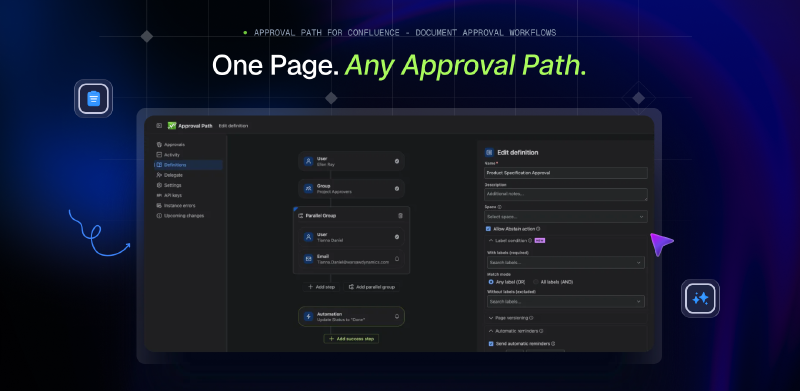
Instead of coordinating every stage manually, organizations can define approval paths that reflect how decisions actually happen. For example, technical documentation might first require approval from the engineering team, followed by security review and then external client sign-off. Each stage can involve individual approvers or groups, with steps running sequentially or in parallel. Workflows can also incorporate voting, consent, conditional actions, reminders, escalation, and delegation, Slack integration, upcoming integration with MS Teams, AI steps that help you perform automated checks or validate whether a page’s content is complete before it proceeds to manual approval, and more, helping teams handle situations where approval is not simply a one-person decision.
This becomes particularly valuable when an organization needs repeatable approval processes across multiple documents, departments, or projects. Rather than reinventing the approval process for every new SOW, policy, or architecture proposal, teams can reuse established workflow definitions and maintain consistent review practices. And importantly, the process remains connected to Confluence, rather than being managed through separate emails, spreadsheets, or disconnected approval tools.
A better experience for everyone involved
Approval processes need to satisfy two very different groups of people:
Internal teams who need structure, visibility, and accountability. They want to know which documents are awaiting review, who is responsible for the next decision, and whether anything is blocking progress.
External stakeholders who usually want something much simpler. They don’t want to learn another platform, navigate an unfamiliar knowledge base, or follow a complicated process to approve one document. They want to understand what they’re approving, provide a decision, and move on.
A well-designed approval process should accommodate both needs without forcing one group to work around the other.
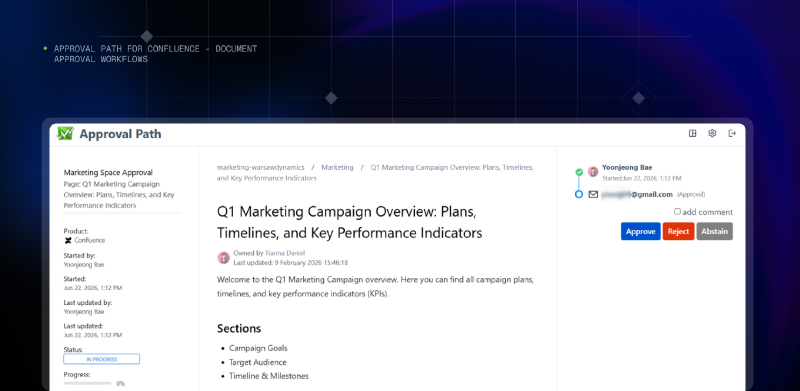
Approval Path connects those experiences through a single workflow, allowing internal and external participants to contribute to the same decision-making process without requiring everyone to work in the same environment.
The future of Confluence approvals goes beyond sign-off
Atlassian’s decision to introduce native Confluence approvals recognizes that creating and collaborating on content is only one part of document management. Teams also need reliable ways to validate, approve, and control content, especially in the age of fast document production and increasing AI use.
For many organizations, native approvals will provide exactly the functionality they need for straightforward internal sign-off. But as approval processes become more complex, particularly when they involve multiple departments, conditional decisions, or external stakeholders, a simple approval request may not be enough.
The real challenge is no longer just getting a document approved. It’s making sure the right people can participate, the right process is followed, and every decision stays connected to the content it concerns.
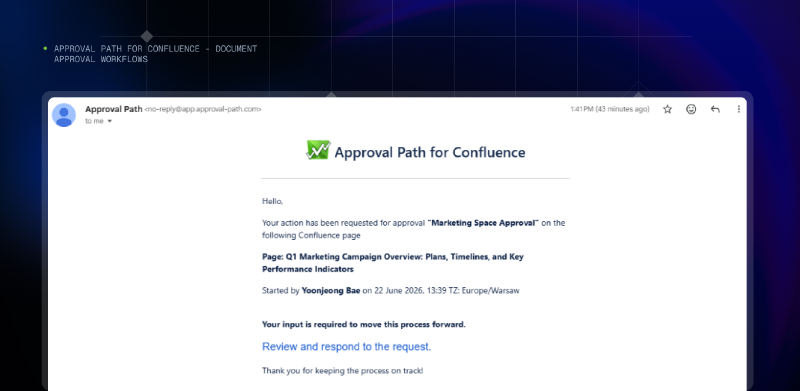
That’s where Approval Path for Confluence helps teams move from individual sign-offs to structured document approval workflows: because an approval should be more than a decision buried in an email thread.
 It should be a reliable, traceable part of how work gets done.