





Fix The Numbering Problem Confluence Never Solved with Macro Pack's Latest Feature
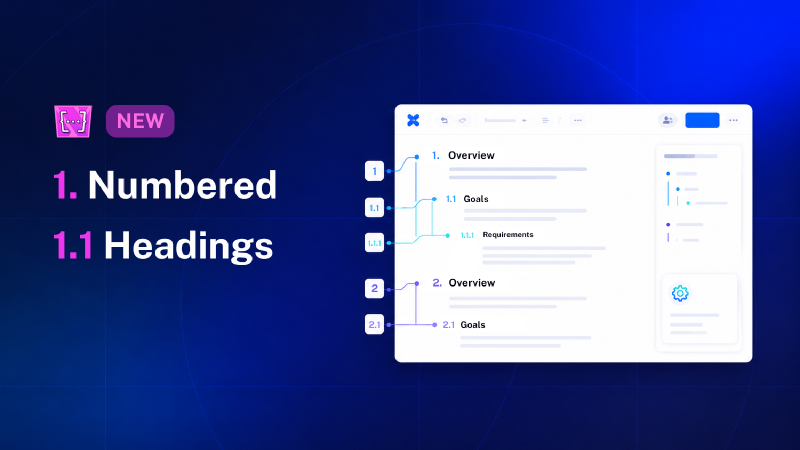
Confluence has helped teams create structured documentation for more than twenty years, yet one deceptively simple feature has remained difficult to solve properly: numbered headings.
It is not a new request. “Numbered Headings” has been one of the long-standing Confluence feature requests for years, especially for teams working with specifications, legal documents, procedures, audits, and other structured content where section numbers are not optional.
And there is a reason the problem is harder than it looks.
Confluence stores headings as semantic elements: H1, H2, H3, and so on. Those headings describe structure, but they do not carry an actual “section number.” To number them correctly, a solution has to read the whole page, understand the heading hierarchy, track counters across multiple levels, handle skipped or missing heading levels, apply the right numbering format, and update everything again when the document changes.
The hardest part is not adding the numbers once - the hardest part is keeping them correct.
That is exactly what Macro Pack’s latest improvement is designed to support: numbered headings for Confluence pages, with smarter handling for applying, updating, and removing numbering prefixes cleanly.
What the feature actually does
Numbered Headings applies (or removes) a consistent numbering prefix to every heading on a Confluence page. A page whose headings read:
Overview / Goals / Background
becomes
1. Overview / 2. Goals / 3. Background
Sub-headings can then follow the same structure:
2.1 Scope
2.1.1 Requirements
2.1.2 Exceptions
Instead of manually editing every heading each time the page changes, teams can apply a structured numbering convention and keep the page easier to read, reference, and maintain.
Flexible numbering for different document styles
Different teams structure documents in different ways. A legal agreement, internal policy, technical specification, and project handbook may all need numbered headings, but not necessarily in the same format.
Macro Pack’s Numbered Headings improvement supports:
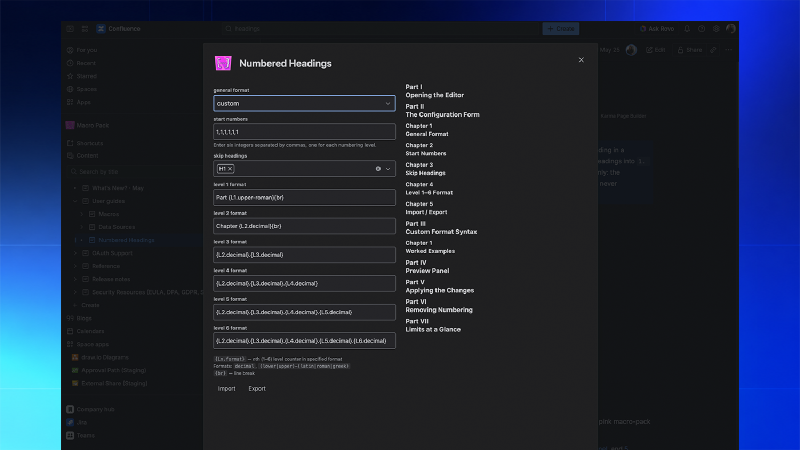
Predefined schemes covering the conventions people actually use: ISO 2145 (1, 1.1, 1.1.1), compound and local decimal, outline numbering (I., I.A., I.A.1.), alphanumeric, and lower/upper Latin, Roman, and Greek.
A custom syntax for house styles, using placeholder tags like {L1.upper-roman} and {br}, so you can build prefixes such as Part I → Chapter 1 across two lines.
Start numbers per level, so a page that is the third in a sequence can begin at 3., or an appendix can begin at zero.
Skip-heading controls, so you can leave an H1 title un-numbered and start numbering at H2: a common need for pages where the H1 is really the document title.
Import / Export of the configuration as JSON, so a numbering convention can be shared across pages and teammates.
Why do numbered headings matter at all?
It is easy to dismiss numbered headings as a cosmetic detail. They are not. Numbering does specific jobs that plain headings can’t:
They make cross-references possible: “See section 4.2” only works if there is a 4.2.
In contracts, specifications, audit files, and standards, sections are referenced by number consistently, and the document becomes much harder to review, reference, and maintain if those numbers are missing, incorrect, or shifted.They encode hierarchy at a glance: ISO 2145, the international standard for numbering divisions and subdivisions in written documents, exists precisely because numbering “clarifies the sequence, importance and interrelation” of sections, “simplifies search and retrieval,” and “makes possible the citation of single parts of the text.” A reader who sees 3.2.1 immediately knows where they are in the structure; a reader who sees an unnumbered heading three levels deep does not.
They are an expectation in regulated and technical work: Atlassian itself has acknowledged that “many teams require numbered headings for many cases ranging from specifications to the legal profession.” Engineering requirements, quality manuals, SOPs, validation protocols, RFPs, and legal agreements all tend to require numbered sections - sometimes by policy, sometimes by regulation, often just because reviewers won’t accept anything else.
A better fit for structured Confluence documentation

Numbered Headings is only one part of Macro Pack, but it fits naturally into what Macro Pack already helps teams do: create cleaner, more capable, and more professional Confluence pages.
With more than 20 macros available, Macro Pack already supports teams that need richer documentation inside Confluence. Numbered Headings adds another layer to that toolkit by helping teams standardize page structure, reduce manual formatting work, and make important documents easier to reference.
For documentation, legal, HR, compliance, technical, and internal knowledge teams, this is not just a formatting feature; it is a way to make Confluence content easier to navigate, maintain, and trust.
Try the Numbered Headings now as part of your Macro Pack subscription or try the app for free via the Atlassian Marketplace.