





The Atlassian license diet: how to trim costs without losing capability

We’ve all been there: your Jira (or Confluence) instance hits 252 users. Everything seems fine until you realize you’re no longer on the 250-user plan. You’ve crossed the threshold into the 500-user tier, and your Atlassian bill has effectively doubled overnight. Lately, with pricing changes becoming more noticeable and impactful (as we explored in our previous article on peak billing ), these situations are no longer edge cases - they’re becoming the norm.
It’s the kind of moment that makes you question how you got there in the first place.
In moments like this, what usually follows is a familiar struggle: someone checks logins, guest accounts, a few emails go out asking: “Are you still using Jira?” or “Do you need the Confluence access?”. Weeks pass, responses arrive slowly (if at all), and in the end, not much really changes. The system remains bloated, and the costs stay high.
But what if the problem isn’t just about too many users? What if it’s about how access is being managed in the first place?
Reevaluating the costs
At the bottom of the problem is a simple mismatch. Atlassian licensing is based on user tiers, but real-world usage is anything but linear. In most organizations, there’s a constant back and forth. Some users are deeply engaged every day, while others log in occasionally or disappear for weeks at a time. Yet they’re all treated the same from a licensing perspective. This creates a quiet inefficiency. You’re not really paying for active users - you’re paying for the possibility that they might become active at some point.
Solving this requires a shift in mindset. Instead of assigning licenses as a static resource, access needs to become dynamic, something that adapts to the actual behavior. That’s where the combination of Flexible User License and External Share begins to make a real difference.
Slim your license cleverly
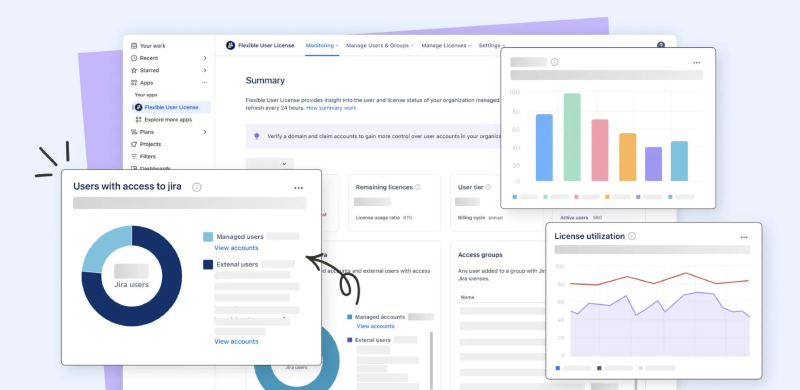
Flexible User License - Auto User Management for Jira ( and for Confluence ) works quietly in the background, but its impact is anything but small. Instead of relying on periodic audits or rough estimates, the app provides a real-time view of your user base. Administrators can instantly see how many users are active, how close they are to their license limit, and where inefficiencies may be hiding. Over time, usage trends and visual reports make it easier to spot patterns, whether it’s a gradual buildup of inactive accounts or sudden spikes tied to specific teams or projects. But visibility is only part of the story. The real value comes from the ability to act on that data with precision.
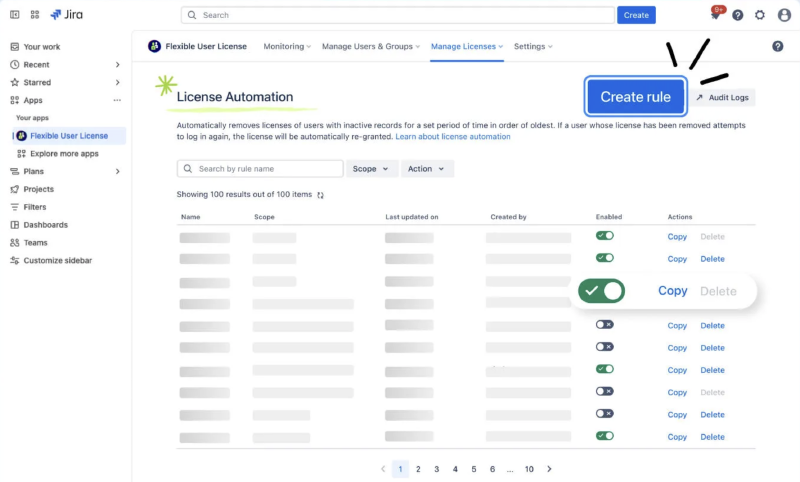
Flexible User License allows admins to define rules that identify unused accounts and reclaim licenses when they’re no longer needed. Instead of licenses being permanently assigned “just in case,” they can be dynamically redistributed based on actual usage. When a seat is freed up, it becomes immediately available for someone who actively needs access, helping teams stay within their existing tier rather than expanding into a more expensive one. At the same time, the system remains fully under administrative control. Critical users and groups can be protected from any automated actions, ensuring that important access is never disrupted. Detailed audit logs track every change, giving teams full transparency and confidence in how licenses are managed.
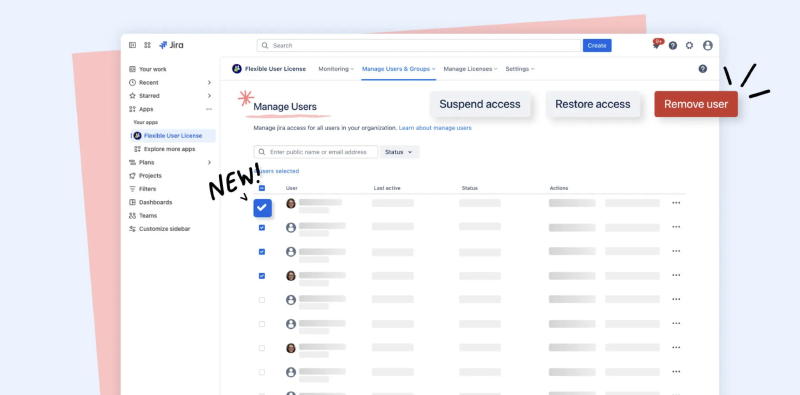
The result is a more balanced, intentional approach to Jira licensing. Rather than constantly reacting to overages or scrambling before renewals, administrators gain a system that continuously keeps usage aligned with reality, reducing waste, lowering costs, and making license management far more predictable.
Extended access without extended license costs
Even with perfectly optimized internal licensing, there’s still another challenge to solve. Not everyone who needs access to Jira or Confluence actually needs a full account. Think about the occasional stakeholders in your ecosystem, a client who wants to check progress, a partner reviewing a specific task, an executive who needs visibility into a project once a month, or even internal users who only engage from time to time. In a traditional setup, the only way to accommodate them is to assign a license (or a guest account). Over time, this kind of access quietly inflates your user count and pushes you closer to the next pricing tier.
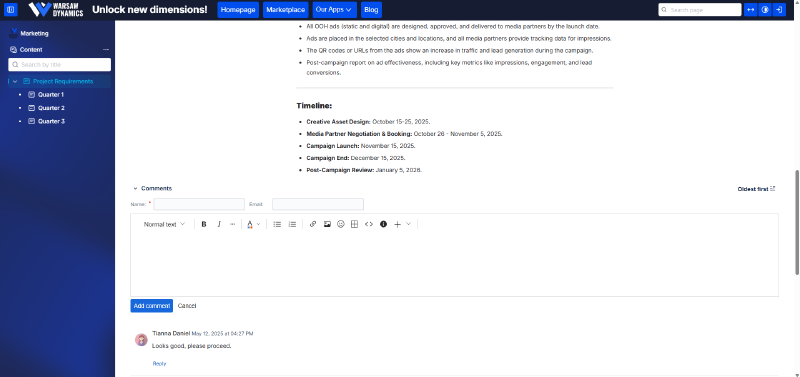
External Share for Jira ( and for Confluence ) offers a different approach - one that separates access from licensing. Instead of onboarding users into your instance, you can share specific Jira or Confluence content through secure, controlled links. These external users don’t need an account and don’t go through the usual setup process, yet they can still interact with the content in meaningful ways. Depending on your needs, you can allow them to simply view information, leave comments, or even contribute edits - all without ever consuming a paid seat.
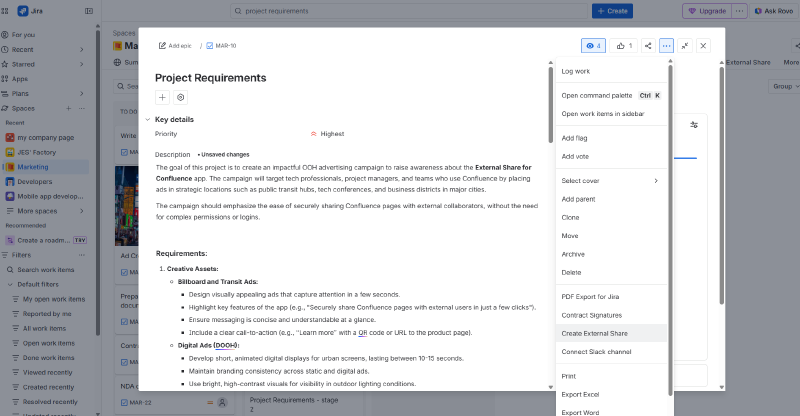
What makes this approach especially powerful is the level of control behind it. Access isn’t just open by default; it’s carefully managed through multiple layers of security and permissions. You decide exactly what can be shared, who can access it, and what actions are allowed. This ensures that collaboration remains both flexible and secure, without exposing more than necessary.
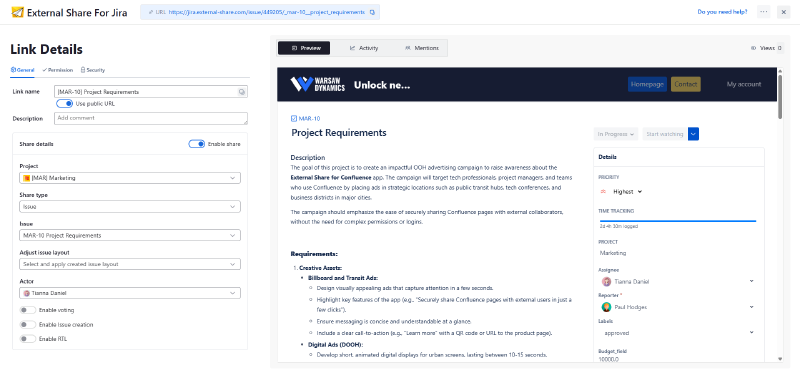
The result is a much more efficient way to work with people outside your core user base. Stakeholders get a clean, focused experience tailored to their needs, while your organization avoids unnecessary license growth. And once access is no longer directly tied to user accounts, you gain the flexibility to collaborate freely - without constantly worrying about the cost of adding one more user.
Combined power of both apps
When Flexible User License and External Share are used together, they create a system where license optimization and access management naturally reinforce each other.
Flexible User License focuses on keeping your internal environment efficient by continuously monitoring usage and reclaiming licenses from accounts that no longer need them. Instead of allowing inactive or occasional users to occupy paid seats, it ensures that licenses are reserved for those who actively contribute. This keeps your core user base lean and prevents unnecessary growth in your license tier.
At the same time, External Share fills the gap that this process might otherwise create. Users who don’t need full access, whether they are external stakeholders or infrequent internal participants, can still stay connected to the work through secure, controlled sharing. Rather than reassigning them a license “just in case,” you can provide exactly the level of access they need, when they need it, without impacting your overall user count.
Together, these two approaches form a continuous loop. Flexible User License identifies and frees up unused capacity, while External Share ensures that access to information remains uninterrupted. One optimizes your costs by reducing unnecessary license usage, the other preserves collaboration by removing the need for those licenses in the first place.
The result is a more balanced and intentional system. You’re no longer forced to choose between controlling costs and enabling access, because both are handled in parallel. Licenses are used where they bring real value, and everyone else can still engage with your Atlassian environment in a way that is both efficient and secure.
Conclusion: Smarter access, lower cost
Optimizing Jira isn’t just about reducing numbers, it’s about using licenses where they truly matter. Flexible User License brings control and visibility to your internal usage, ensuring that every paid seat delivers value. External Share, on the other hand, removes the need to assign licenses where they aren’t necessary, enabling seamless collaboration without added cost. Together, they create a more balanced, efficient system - one where access is flexible, costs are predictable, and your Jira environment scales without unnecessary overhead.