






How to Centralize Approval Auditing and Eliminate Cross-Checking in Jira
Why Audit Trails are Essential in Modern Jira Use
An audit trail is a chronological record of all system activity, showing who performed each action, when, and how. In Jira, the history report serves as a mark of trust. As collaboration extends to external vendors, partners, and clients, a strong audit trail becomes essential for accountability and regulatory compliance.
This is particularly crucial for decision-making processes, where capturing evidence of a manager’s sign-off or a legal team’s approval is critical to proceed.

Analyzing the Audit Trail Gaps in Native Jira Functionality
While Jira provides excellent activity logs, it often falls short of meeting the rigorous audit trail requirements of complex business processes and external collaboration environments.
Native Jira Approvals, available in Premium and Enterprise plans for Company Managed Projects, offer a significant improvement by making the decision status JQL-searchable.
| Audit Trail Aspect | Limitations in Native Jira Approvals |
|---|---|
| Technical Execution & Errors | Native logs lack a centralized and easily filterable record of instance errors. Investigating a stuck approval often requires administrators to manually cross-reference timestamps between the work item’s activity log and the Organization Admin security Audit Log. This logging separation slows down fault tracing and audit reviews. |
| Report Granularity | While JQL allows filtering by the decision status, it is challenging to easily extract and filter logs based on granular approval metadata that is not a standard Jira field, such as the specific reason for an approval failure or changes made to advanced configuration settings. |
With Non-Jira Licensed Users
For collaboration involving external individuals without a full Jira license, Jira Native Approvals cannot assign these external users as official approvers. Only licensed Jira users can be designated in the approval step, so external partners, clients, or contractors cannot press the approval button or appear in the audit trail as the actual decision maker.
Our Solution: Achieving Compliance-Grade Auditability 
Approval Path for Jira extends Jira’s native audit capabilities by providing full transparency from process design to real-time execution.
Auditing the Entire Process, Not Just the Outcome
The app meticulously records every status change within the approval process. This includes the current status of the approval definitions (in progress, approved, rejected, archived, expired) and the activity status, detailing exactly who started, approved, or rejected the process.
This feature allows organizations to prove exactly how the approval process was configured at the moment any decision was made.
Exportable Audit Logs with Flexible Filtering
Administrators and users can CSV export only the information they need for auditors, compliance teams, or internal stakeholders.
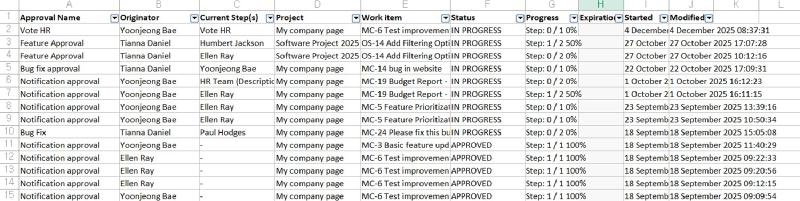
Exportable approval data includes:
-
Core Details: Approval Name, Originator, Current Step(s), Project, Work Item, Status, Progress, and Expiration.
-
Time Stamps: Started and Modified Dates and Times.
-
Activity Trail (for detailed audit history): Approval Name, Originator, Step, Decision, Project, Work Item, and Date.
-
Instance Errors: Error type, Level, and Message (including log ID and diagnostic details).

Real-Time Process Transparency and Accountability
The app stays synchronized with group member settings and records related events in the approval history. If an approver is removed and replaced with another member during a pending approval, the app creates a metadata record of the change and reassigns the task, capturing the new approver’s decision with full accountability. This removes the need to check separate logs to understand why an approver changed.
Work Item Level Approval History
Users can open any Work Item to view the full approval history, including past decisions and approvals in progress.

Executed steps are shown with clear status indicators. Each action includes an accurate timestamp next to the approver’s name. For external approvers, the system records their email address and timestamp to ensure audit coverage.
Achieving Safer and More Transparent Collaboration
Native Jira features provide a starting point for tracking activity, but compliance grade audit trails for complex approval workflows and external collaboration require specialized tools. Approval Path for Jira gives organizations the depth of record and flexible filtering needed to meet strict regulatory requirements.Executed steps are shown with clear status indicators. Each action includes an accurate timestamp next to the approver’s name. For external approvers, the system records their email address and timestamp to ensure audit coverage.